Quick usage guide
Contents
Launching Pose-Trigger
Open Terminal.
Run the following command on Terminal:
$ pose-trigger
Note
When being run without a parameter, Pose-Trigger will use the device at /dev/video0 by default. In case you want to use e.g. /dev/video1, specify the device as the parameter, i.e. run pose-trigger /dev/video1.
To check which path corresponds to your camera, please refer to the Appendix.
Organization of the main window
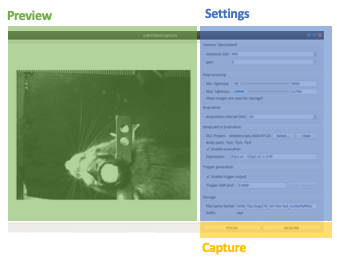
Overview of the main window
The Pose-Trigger main window can be divided into three groups:
The Capture buttons (yellow) are for starting/stopping acquisition.
The Preview panel (green) provides an on-line preview of the acquired video frames. If estimation of body-part positions is activated (refer to DeepLabCut evaluation), estimated positions will be shown as colored circles, too.
In the Settings panel (blue), you can configure how acquisition is performed (refer to the Panel-by-panel guide).
Capturing videos
Capture modes
There are two modes of running for Pose-Trigger:
FOCUS mode: capturing video frames without storing them
ACQUIRE mode: captures video frames and stores acquired data
You can start/stop either of the capturing modes by clicking on the button at the bottom of the main window.
Caution
Pose-Trigger does !not! stream data into storage during acquisition! During acquisition, it keeps all the data in-memory. The data will be written out to a file only after acquisition. The duration of acquisition will be thus limited to the order of 1–2 minutes.
Note
Currently, the following parameters are “hard-coded” and used as default:
Image format: 640x480 pixels, 16-bit grayscale
Timing generation: a busy-wait algorithm
Storage format: the NumPy zip-file format (.npz)
Format of the saved files
The data are saved in the NumPy zip-file format (i.e. “.npz” file). Each file includes the following entries:
Name |
Always there? |
Description |
|---|---|---|
|
Yes |
the 3-D frame data, (frame-index, height, width) |
|
Yes |
1-D array containing unix timestamps in seconds |
|
Yes |
a JSON-serialized text object containing information on acquisition configuration |
|
No (Optional) |
when a DeepLabCut project is selected; 3-D array with the (frame-index, parameter) shape |
|
No (Optional) |
when pose-evaluation is enabled; 1-D boolean array of evaluation results |
TODO
add some examples for metadata (and probably for other entries, too)